Introduction and complete guide to content hubs
No matter the industry or sector you operate in, chances are search engine result pages are full of content related to your subject matter.
There’s a well-known adage that the internet is a great place to hide content. And that’s truer than ever in the modern content world. Even if your content is well written, skill alone might still not be enough to appear above your competitors in search.
Brands work tirelessly to create content that serves their audience and drives their sales. From countless hours of content strategy and planning, to research, and production, the hope is to see results once your content goes live. But good content alone isn’t enough. Your brand needs to show wider expertise and authority around your subject matter.
That’s where content hubs step up to the plate.
Ensuring content performance isn’t as easy as simply uploading content to your website. You need to carefully consider where it should be situated and how it contributes to your wider topical authority. That all comes from developing a tailored collection of content types and articles covering a specific topic. Each piece interlinks with the others, providing a deeper level of information within a central base your audience can easily explore.
Let’s take a closer look at why content hubs are a priceless asset in your content strategy, and explore some top tips for creating them.
What is a content hub?
A content hub is a central space on your website dedicated to a specific theme or topic. More expansive than a traditional blog, a content hub is designed to host several supporting and complementary content types that work together to show deep authority on that particular subject.
Your content hub might include blogs, as well as product detail pages, videos, webinars and how-to guides, along with other content types. Content types vary, but the important thing is that all your content pieces cover the same topic. Doing so allows content to work together to provide your audience with all the information they need.
For example, if you’re a skincare brand with a range of products, your traditional blog might contain articles around all elements of your industry, from trends and application tips to buyer’s guides and general wellbeing. Your content hub, on the other hand, would be more focused, drilling down into one skincare theme, such as anti-aging.
By building a more focused content hub, you’re able to bring together content like webinars on how the skin shows signs of aging over time, video guides of preventative application techniques, product buying guides for fighting the signs of aging, and informative articles on how to keep the skin looking young.
Why do you need a content hub?
If your brand has been publishing in one central place for some time, the idea of building more focused content hubs may seem a little daunting. The good news is that you probably already have plenty of content to start your hubs. And doing so offers plenty of benefits.
Increasing visibility and traffic
Content hubs typically focus on topics and themes with high search volumes. If users are looking for content, you need a place to help them find it. If you consolidate your most sought-after content in a logical, easy-to-find place, with links between relevant pages, you’re demonstrating your expertise. That means you’re also more likely to see traffic improvements.
Search engines will recognise the effort made to logically group content in a way that benefits users, increasing your chances of ranking well.
Building authority
Having real depth in content types covering a specific subject matter demonstrates your brand’s extensive knowledge to users and search engines alike. A single blog, no matter how detailed and expert, can only go so far to showcase your expertise. An entire library of information on one subject shows true depth and sets you apart from competitors.
Improving engagement
When you offer your audience a variety of materials to explore, you give them a reason to engage more often and for longer.
More related content means more reasons to stick around. If you publish a fantastic piece of content, but it’s standalone, your users may read it and leave when they reach a dead end. However, if you follow a blog with a related case study or product overview, you invite the user to stay on site and continue their journey.
This also increases consumer attachment and advocacy, which can be beneficial as the user progresses to the purchase stage and beyond.
Generating leads
High-quality leads are the ultimate goal for any brand. A well-crafted content hub can make this a reality.
By increasing brand engagement, demonstrating topic authority, and serving users with the tools and resources they need for purchase intent, you’re more likely to generate leads. A good content hub will mirror the user journey. A top of the funnel piece that attracts someone to the site should link to related products and solutions that help nurture the journey and guide users towards a desired action, helping generate leads.
Improving user experience
User experience (UX) is all about making it easy for users to navigate your site and complete their desired actions. Finding what they’re looking for should be as quick and friction-free as possible.
A well-organised content hub can make this a reality via effective information architecture. Your hub should feature well-structured layouts, be created with a strong internal linking approach, and use clear CTAs and paths to conversion that make it easy for users to find their way around and explore a path towards their eventual goal.
Differentiating from competitors
Standing out from the crowd is all about offering more to your audience than competitors do. Other brands in your industry might typically cover the same subjects because they’re all offering something similar within that area. The trick is to do it in a different way.
A content hub sets a brand apart from the rest by demonstrating authoritative expertise. If a brand combines proof of knowledge through various content types with superior UX, its content hub becomes the go-to place for users.
Types of marketing content hubs
Content hubs share similar goals. But not all content hubs are the same. There are several different types to choose from when building your hub strategy. And the one you need will largely depend on the industry, subject matter, and purpose of your content.
Let’s take a look at a few of the most common types of content hub.
Hub and spoke
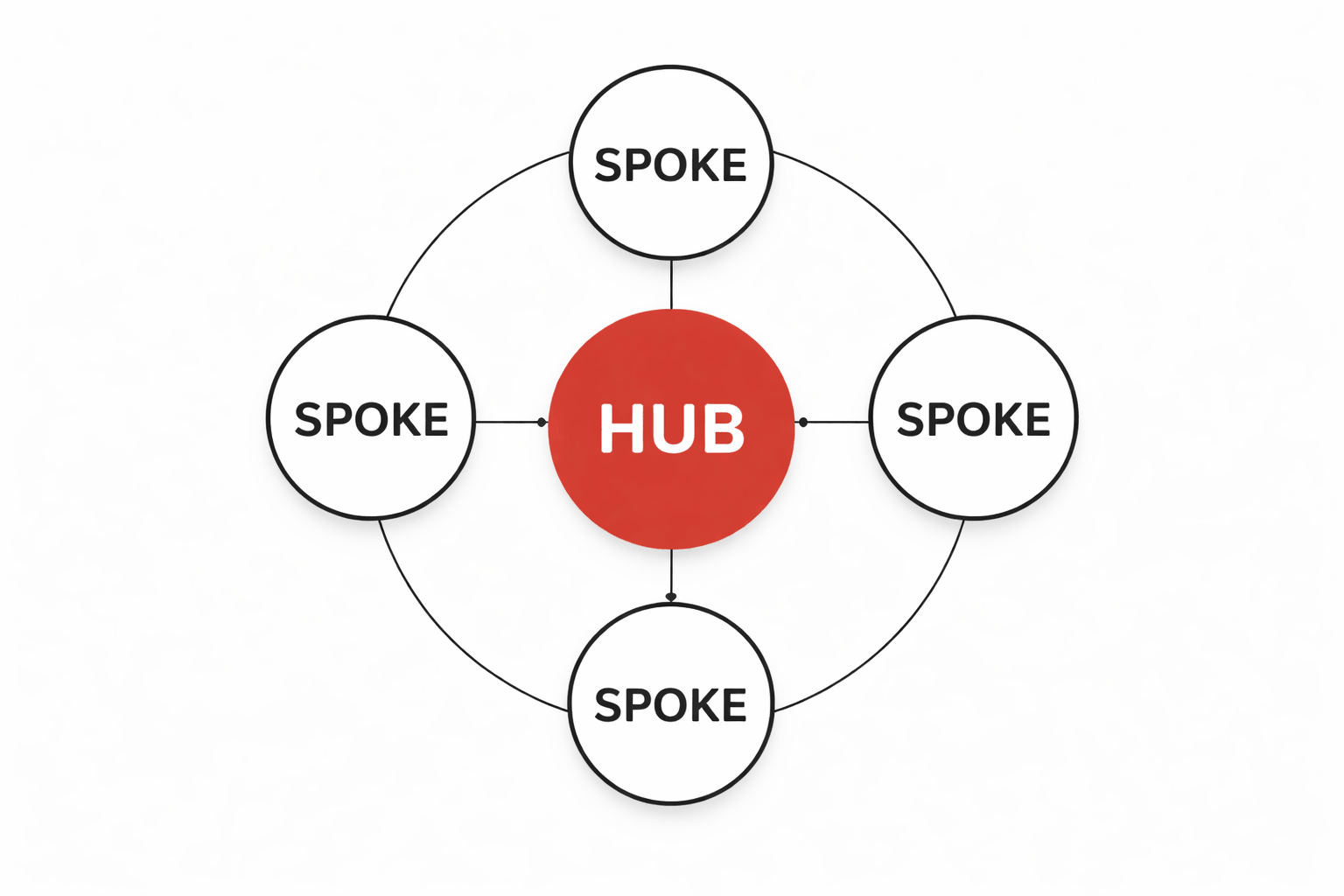
Perhaps the most common content hub type, the hub-and-spoke model centres around a single long-form piece of content. This serves as the heart of your content hub and is where high-volume keywords can be targeted.
The spokes surrounding this hub represent additional subtopics. This is where your supporting content lives. Sometimes called cluster content, spokes relate to the broader topic and can increase authority. While individual spokes might not connect with each other, they all must link thematically to the hub.
Let’s imagine you’re creating content for a digital marketing agency. You might want to create a content hub with a central whitepaper that gives an educational overview of digital marketing strategy. This is the heart of its strategy hub. From there, it links to more specific spokes, such as blog posts and infographics, each of which goes into the finer details of related subtopics, such as easy on-page SEO techniques, content calendars, or performance tracking tips.
Content library
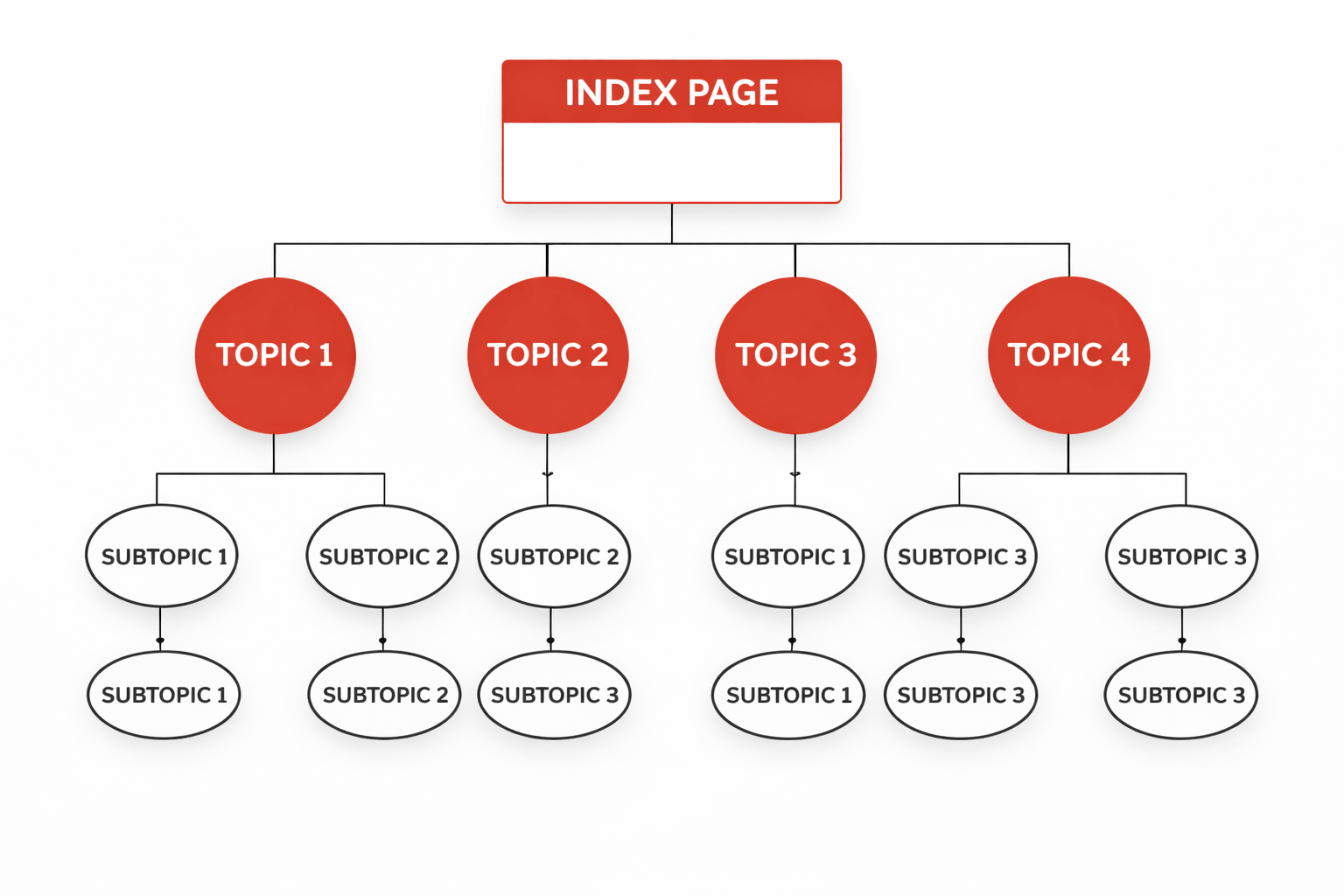
Offering increased structure to content organisation, content libraries use an index page to house several main topics rather than a single central subject. Each topic then has links to relevant subtopic pages.
Content libraries are effective for brands with expertise in several areas and allow you to showcase this varied expertise.
Topic gateway
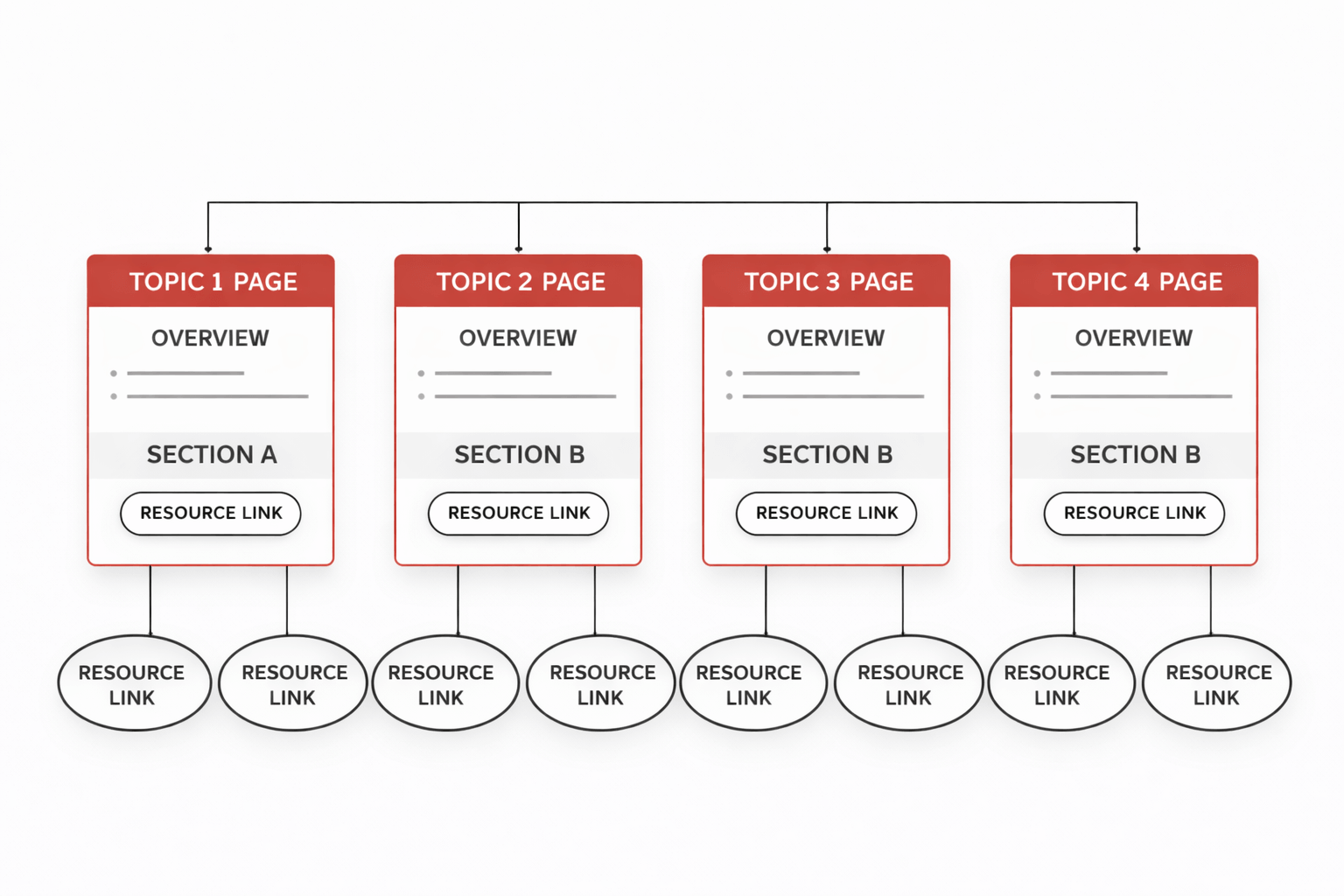
Brands with extensive site content may benefit from the topic gateway structure. Offering elements of both the hub and spoke and content library models, each topic centres around an individual page with dedicated content that provides an overview and links to individual resources and relevant content.
Unlike a standard blog landing page, which simply lists posted content, the main page of a topic gateway provides key sections of the topic and guides users to more in-depth resources. For example, a single Wikipedia page with information on a celebrity would be the main page, giving a large overview of what they are famous for, their career history, and their personal life. That page includes many internal links to related pages the user can follow to browse further information, such as their filmography, awards, and wider career.
Content database
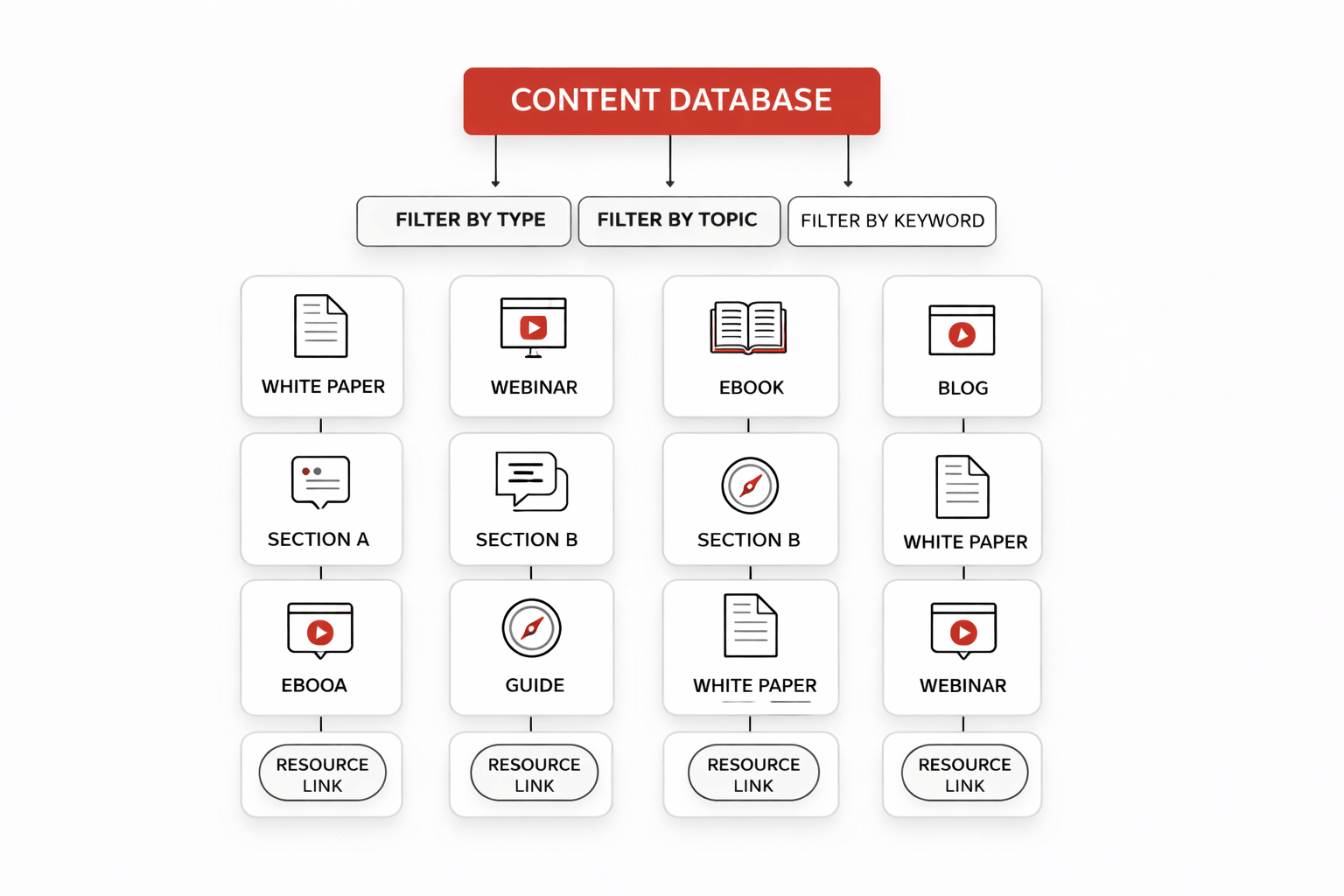
A content database houses all content published by a brand, serving as a complete archive of everything from white papers, webinars, and ebooks to blogs and guides. This model is typically used to organise massive amounts of content.
Because content databases are so large, they need to be heavily and efficiently organized through the use of filters and naming conventions. Users should be able to sort content by specific criteria, such as keywords and overarching topic, allowing them to easily find what they’re looking for in a high-volume space.
Content hub examples
There’s a content hub model for every industry and company size — it’s all about finding the right fit. Here are just a few of our favourite examples of effective content hubs to help you choose the one you need.
Travel industry: Kayak

KAYAK is a travel industry leader in search, helping users find the best deals on flights, hotels, and holiday packages, among other travel must-haves. Covering all areas of travel, it has the authority to create a variety of informational content and combine it into a carefully crafted content hub.
The KAYAK content hub focuses on delivering users with inspiring guides, travel tips, the latest news and travel trends, and KAYAK’s unique tools. It’s organised into six categories:
- Travel inspiration – Inspirational guides advising users where to travel depending on their unique interests, such as seasonal hotspots and UK excursions. Includes KAYAK tools, such as a calculator to work out where you can travel to by saving on small expenses and even a virtual reality holiday platform.
- Flying – An informative source of flying and airport navigation tips, travel documents, and luggage rules.
- Hotels + stays – Specific hotel recommendations to align with the user’s unique travel needs.
- Car hire – Outlined essentials of car hire when travelling, rules of driving abroad, and detailed road trip guides.
- Budget travel – Expert advice on travelling on a budget alongside specific recommendations of budget destinations.
- Newsroom – The latest updates on the travel industry and destinations.
Due to KAYAK’s vast volumes of content, it uses a hybrid of two content hub models — hub and spoke, and topic gateway. The homepage serves as the central hub, with clear categories and links to these. It also highlights featured articles from the central hub.
However, the individual category pages serve as entry points for users searching for a specific theme, such as car hire. While the featured articles for that category are highlighted from the main hub, there’s more to be found within that spoke, giving KAYAK’s content hub a partial topic gateway structure.
eCommerce: John Lewis
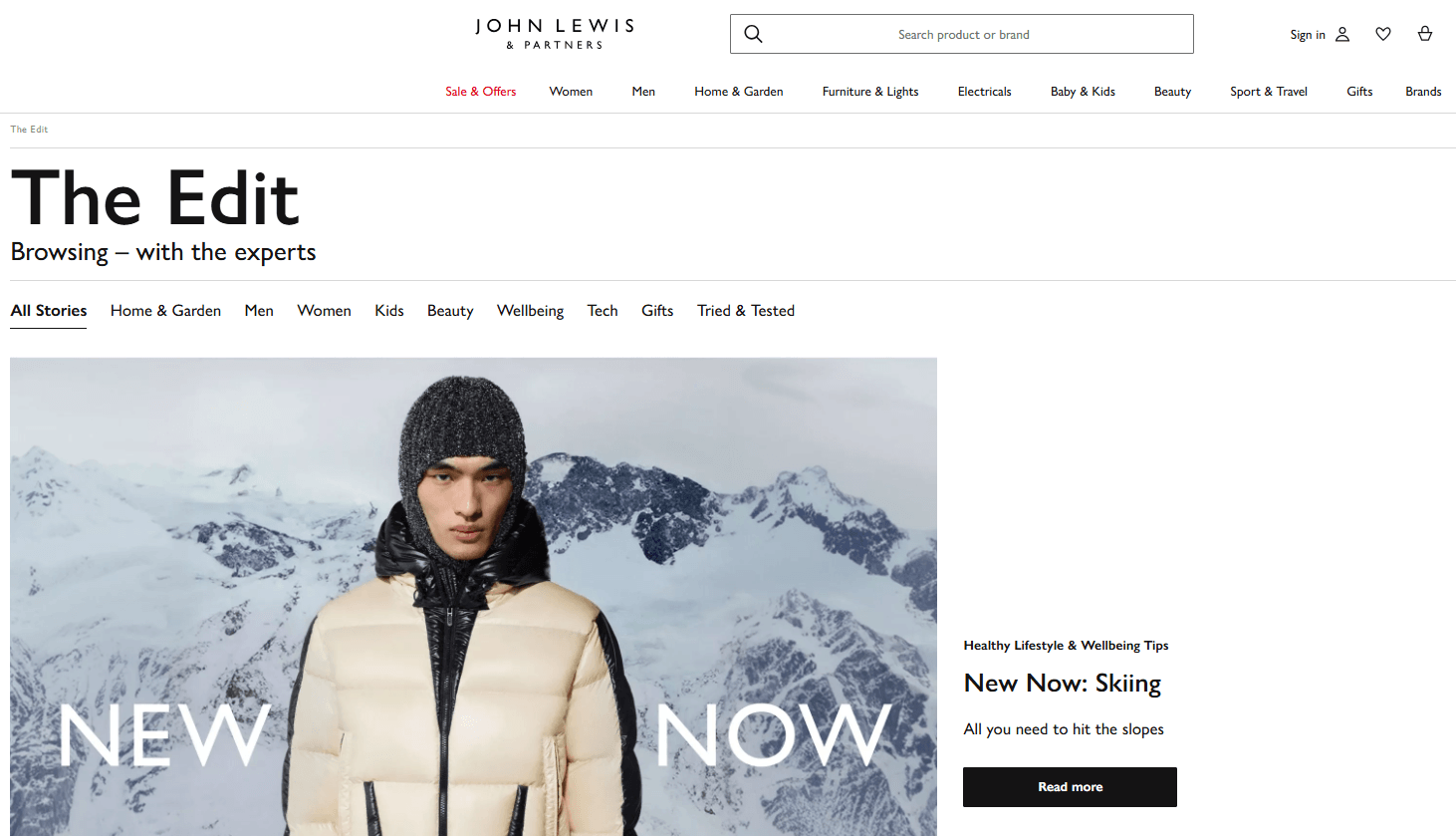
An eCommerce giant, John Lewis specialises in various areas of the retail industry, including fashion, home, beauty, and technology.
While not a traditional informational content zone, the John Lewis content hub is curated with editorial content, including inspirational guides covering lifestyle, gift buying, and product inspiration. It is split into nine categories: Home & Garden, Men, Women, Kids, Beauty, Wellbeing, Tech, Gifts, and Tried & Tested.
The Tried & Tested page provides more in-depth reviews of individual products, while the others boast reviews and guides. Each category is broad, yet links back to the central hub topic of inspiration.
The John Lewis content hub uses elements of the hub and spoke and topic gateway models, but is primarily a content library, comprising searchable resources users can explore by filtering by content topic. Thanks to having designated themed categories, the John Lewis content hub operates like an online magazine. Even though users may land there while searching for specific inspiration, the hub promotes exploration and related topics to keep them engaged.
Some sections of the John Lewis content hub serve as pillar pages that support a single theme and link to related content. Users land on a single topic and are nurtured throughout their journey to discover further content. Providing this variety of extensive resources builds the authority John Lewis holds for the specific theme, reinforcing trust among users when they enter the purchase consideration stage.
SaaS: Square
With so many topics to cover within the SaaS industry, it’s no surprise that the Square content hub boasts an abundance of content resources. Square helps customers manage electronic payments and offers various business operating tools.
The Square content hub is divided into seven distinct categories: Starting Your Business, Reaching Customers, Selling Anywhere, Managing Your Finances, Operating Your Business, Growing Your Team, and Inside Square. The content types published vary, ranging from how-to guides tailored to specific industries to thought-leadership articles and even podcasts.
Square’s vast content repository addresses a range of industries, each with varying topic coverage. So it’s no surprise that the Square content hub follows the topic gateway model. The hub is designed to guide users from a specific theme or topic to discover deeper, relevant articles. Each section is expansive on its own, which sets it apart from other models like hub and spoke.
The clear structure of Square’s content hub follows natural pathways to the brand’s tools without feeling salesy. Content instead talks to the user’s immediate and specific needs, with the option of purchase present if and when they reach that stage.
How to create a content hub
Whichever content hub model you choose to build, it’s important to implement your plan correctly. Here are just a few of the important steps to building a content hub.
1. Identify your audience and target topics
Your audience is at the heart of everything you do, and content hubs are no different. Before building a content hub, you need to know who your audience is, what their search intent is, and what they want to achieve.
Knowing who the audience is makes it easier to determine what types of content they need. This can be found through exploring the online spaces the audience engages with and communicates within, and through your own understanding of common questions within your expertise. You can also find relevant topics through keyword research, competitor audits and SERP analysis.
2. Conduct keyword research
Keyword research can help understand the opportunities for content production across topics. From titles to content types, keyword research can shape your content hub and improve performance. By researching and grouping keywords into topic clusters, you can easily see which are the most valuable topics in your sector, helping determine what themes you should centre your content hubs around.
Keywords with high search volume should be targeted on the main page of the content hub to make them more easily discoverable in search. As this is the first page that provides an overview of the topic before leading to other areas, it is the best place to use the broadest, most searchable keywords.
Longer-tail keywords are typically reserved for the additional content that branches off from the main hub. This is where content becomes more specific while remaining relevant to the main topic. If used well within the branching content, those pages have a chance to perform on their own, ultimately bringing users back to the broader hub.
3. Analyse existing content
If you’re not starting content production from scratch, a review of your existing content is a must. Group your existing content into broad themes and work out which areas you have enough content around to develop content hubs.
You can also use Google Analytics and Google Search Console to assess how existing content performs in search, as well as which keywords they rank for. This can help identify which page is your central hub page, as well as showing where you may have gaps around well performing pages in which you can create more content.
4. Optimise site structure
The architecture of a content hub is almost as important as the content within it. You need a clear plan for where the content hub will sit on the site and how it will work.
This is easier to plan once you know how much content will be in the hub and whether several sub-topics are needed. From there, a model can be chosen, with clear categories featuring relevant content under each. The hub’s architecture should also be reflected in the URL structure, ensuring the hub category is listed alongside the content title in a subfolder. For example:
www.domain.co.uk/content-hub-name/beef/how-to-cook-the-perfect-steak/
In the above URL example for an online butcher brand, it’s clear the article ‘How to cook the perfect steak’ sits neatly within the Beef category of the content hub rather than simply branching off from the main page. A clean URL such as this improves clarity for bots crawling your site. Search engines can better understand the topic of the page and the path it took to get there from the original page, then reward you with improved rankings.
There must also be consistent links across the website that lead to the content hub. These can be placed in the site navigation and footer, making it easier for users to find the correct page and, as an added bonus, for search engines to find and crawl the site.
5. Create a content plan
Your content plan outlines all content to be included within the content hub. Whether that content already exists or needs to be created, it should fit within the wider content strategy to ensure it serves a valuable purpose.
It helps to start with a hierarchy of importance. The first topics to focus on should directly fit into the main category, with subtopics coming later. The next step is to decide what content type those topics should be formatted as — is it blogs and articles, video, or something else? Each content type delivers something different, so it’s important to understand why you might choose a specific one and how it can move your strategy forward.
6. Create and optimise content
Once your topics and content types have been determined, you can start creating content.
The main page of the content hub should be your first port of call, before building out the hub with supporting subtopic content.
Any existing content that needs to be optimised can then be updated to align with the new content. Focus on internal linking after creation to ensure everything flows nicely once published.
7. Track content hub performance
A content hub is only successful if it achieves its intended goals, whether that’s to increase subscribers to your newsletter or rank for difficult keywords.
Regular reviews of your content hub’s performance help ensure it’s achieving what you want it to. By tracking how a content hub performs in terms of engagement and leads, you can determine what works well and what requires changes.
Content hub best practice
While every content hub works differently, there are some best practices that apply to all.
Utilise internal linking
For a content hub to perform as intended, you need to implement strategic internal linking. This guides users from one section to the next, providing further resources and showcasing additional knowledge. Internal linking also demonstrates to search engines how each of your pieces of content relate to one another.
Content should naturally and logically link to related content without feeling spammy. For example, you can link an informational piece to an appropriate conversion page to nurture a user’s journey, giving them the knowledge they need and a final place to land when they get it.
Any commercial page should also link back to relevant informational pages within the hub to allow search engines to find the content and understand its relevance to the topic.
Keep content fresh and up-to-date
Content should be created with the intention of it being evergreen so it remains relevant for longer. Of course, changes within industries happen all the time, so updates may be needed.
Regular checks of content within the hub are necessary to ensure that sourced data and claims are up to date. If anything is outdated, search engines may bypass the content in favour of competitor hubs. A dedicated content team can leverage its expertise to review existing content and make the necessary changes to help brands remain relevant in their field.
Need help creating a future-focused content hub? Get in touch.


