How to handle out-of-stock product pages on ecommerce websites
Dealing with out-of-stock products is an annoying but inevitable part of running an ecommerce website. Items can go out of stock for lots of reasons, including seasonal disruptions, discontinued lines, or surges in popularity.
Products being out of stock isn’t a problem in itself, but it can cause issues for customers. And if you’re operating an ecommerce site, how you handle these product gaps will have a huge impact on everything from SEO performance to the customer experience and, ultimately, revenue.
Let’s take a closer look at why getting the out-of-stock experience right is so important in ecommerce. We’ll also explore the most common mistakes ecommerce sites make, and reveal how you can effectively handle different out-of-stock situations in a way that satisfies real users as well as SEO algorithms.
Why handling out-of-stock products matters
The way ecommerce websites handle out-of-stock product pages affects three core business areas:
- user experience
- SEO performance
- conversions.
Let’s look at how to tailor out-of-stock pages to ensure the best outcomes in each of these areas.
User experience
From a user’s perspective, there are few things more frustrating than clicking a product listing and getting a generic out-of-stock message, or even worse, a 404 error page.
A good out-of-stock experience minimises this frustration by:
- Telling the user quickly and clearly that the product is unavailable.
- Clarifying whether the product is gone permanently or if it’s coming back into stock at another time, ideally with timescales provided.
- Providing alternatives, such as suggestions for similar products, or an option to sign up for restock notifications.
Retailers like IKEA excel here. Its product pages clearly show availability by location, including the number of items left, pinpoint the nearest alternative stores, and give the option to only show stores with available stock.
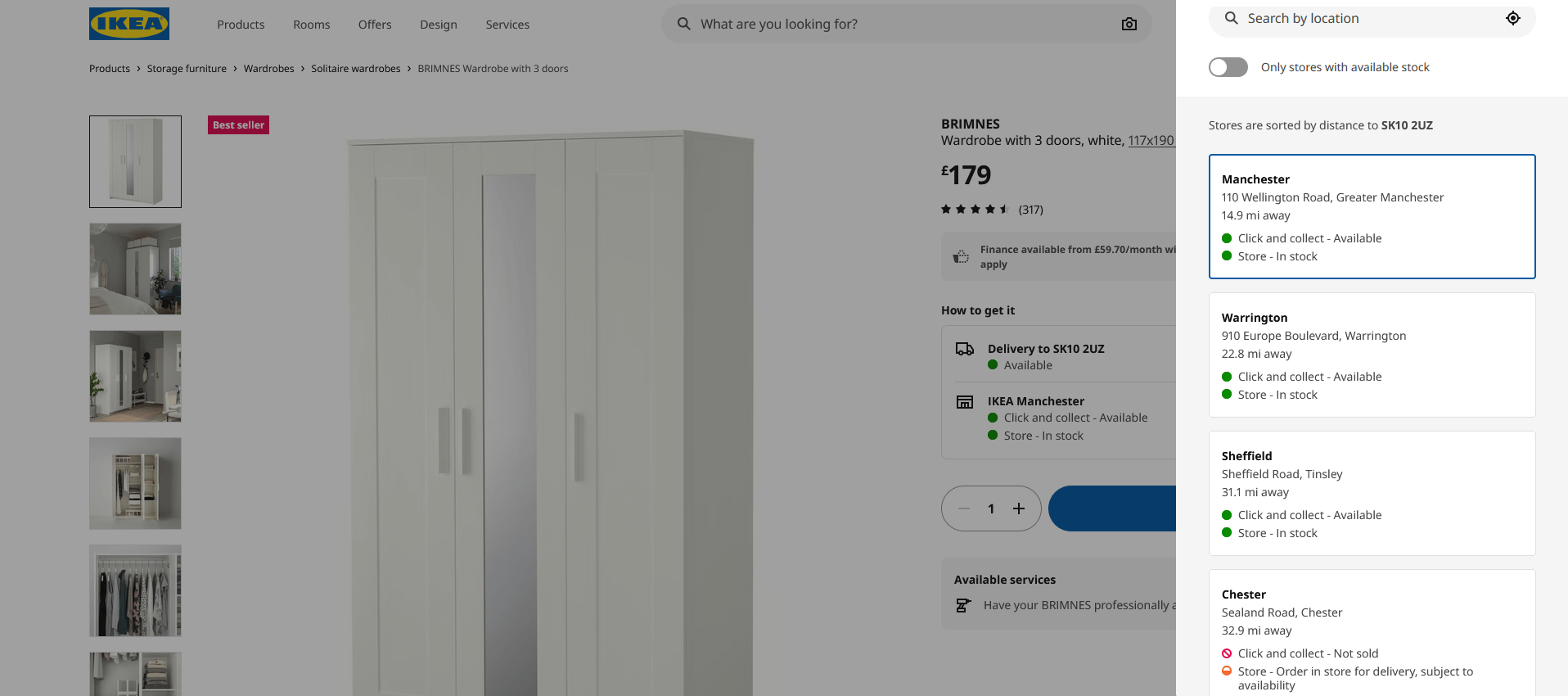
This makes the user experience as convenient as possible and ensures customers aren’t greeted with any unwanted out-of-stock surprises when they go to order or collect their product.
SEO performance
Stock availability has an often overlooked but important influence on SEO performance. Search engines consider every aspect of your site when assessing its usefulness, including out-of-stock pages. Here are a few key ways out-of-stock pages impact SEO.
Crawl efficiency
Search engines have a limited crawl budget, and you want it to be spent on your site’s most valuable pages. If your website includes large numbers of low-quality out-of-stock pages returning errors or thin content, crawl resources are wasted. This limits the visibility of pages that actually drive traffic and revenue and hampers your organic efforts.
Ranking stability
Handling out-of-stock pages incorrectly (such as by removing or neglecting to update them) can cause your site to drop out of the rankings for valuable product keywords.
Engagement signals
Google evaluates URLs individually, but site-wide quality signals still matter. High bounce rates and low time on page caused by poor out-of-stock experiences can negatively impact your site’s overall search performance.
Conversions
Every out-of-stock page represents a moment of high commercial intent wasted. The user has already found your site, selected a product, and may have converted if the product was available. The way that “Oops, out of stock!” moment is handled can lead to anything from an alternative purchase or email sign-up to the user exiting your site and never visiting again.
Top fashion retail brands like ASOS increase the chances of out-of-stock pages still driving conversions by providing the option to sign up for restock notifications while also offering a range of similar alternative products.
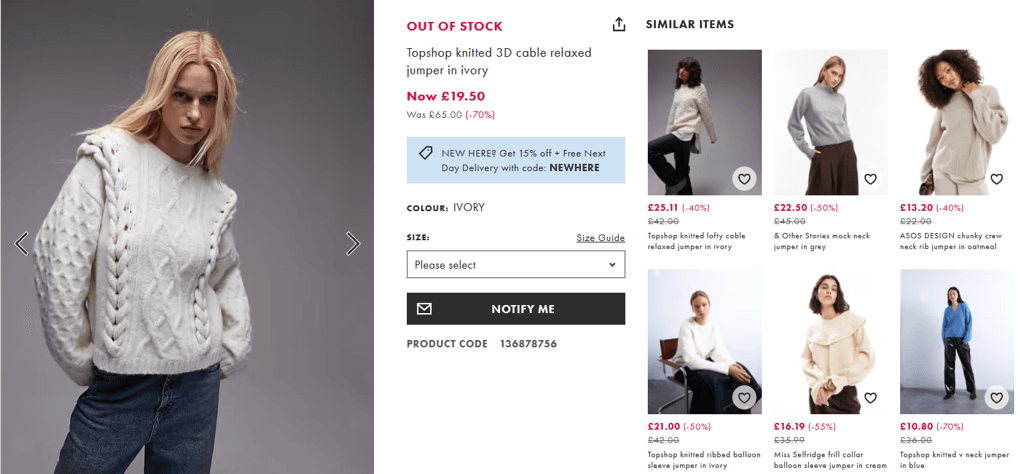
This keeps users on the site in the moment, while leaving the door open for future conversions when the product is restocked.
Common out-of-stock mistakes
While some brands handle out-of-stock pages well, many others make the same mistakes when products are unavailable. Common pitfalls can include creating a user experience problem while trying to solve an SEO problem, or vice versa. Let’s look at some of the most frequent out-of-stock blunders, so you can avoid them on your site.
Redirecting users without explanation
Redirecting an out-of-stock product page to a category page or another product can feel like an easy, low-effort solution. But if it’s done without clear signposting, it can cause problems. From the user’s perspective, it can be confusing when they click a link and land on an unexpected page, with no acknowledgement that the original product is unavailable. This can feel disorientating and erodes trust, as users may assume the site is broken or misleading.
Sending users to a generic 404 page
While 404 pages are not inherently bad for SEO, they rarely result in a positive user experience. The worst case scenario is sending users to a generic 404 page that doesn’t acknowledge the specific product they want. These pages achieve little other than increasing your bounce rate. And they don’t even serve the purpose very well, as there’s nothing to indicate to the user that the product is out of stock, as opposed to the website returning an error.
Generic 404 pages typically represent a dead end too. Custom 404 pages that include an out-of-stock message and helpful navigation options to continue the journey are better, but for product pages with high demand, they’re still far from ideal.
Removing pages too quickly
You might think that once a product has gone out of stock, its page has served its purpose. That’s why many ecommerce brands make the mistake of removing product pages as soon as they go out of stock. This can lead to several issues, including lost rankings for high-value keywords, broken internal links, and lost backlink equity. And if the product does come back into stock later and you put the page back up, it’s going to have to build that authority all over again.
Now we know what not to do, let’s look at how to deal with out-of-stock products effectively.
How to handle out-of-stock product pages
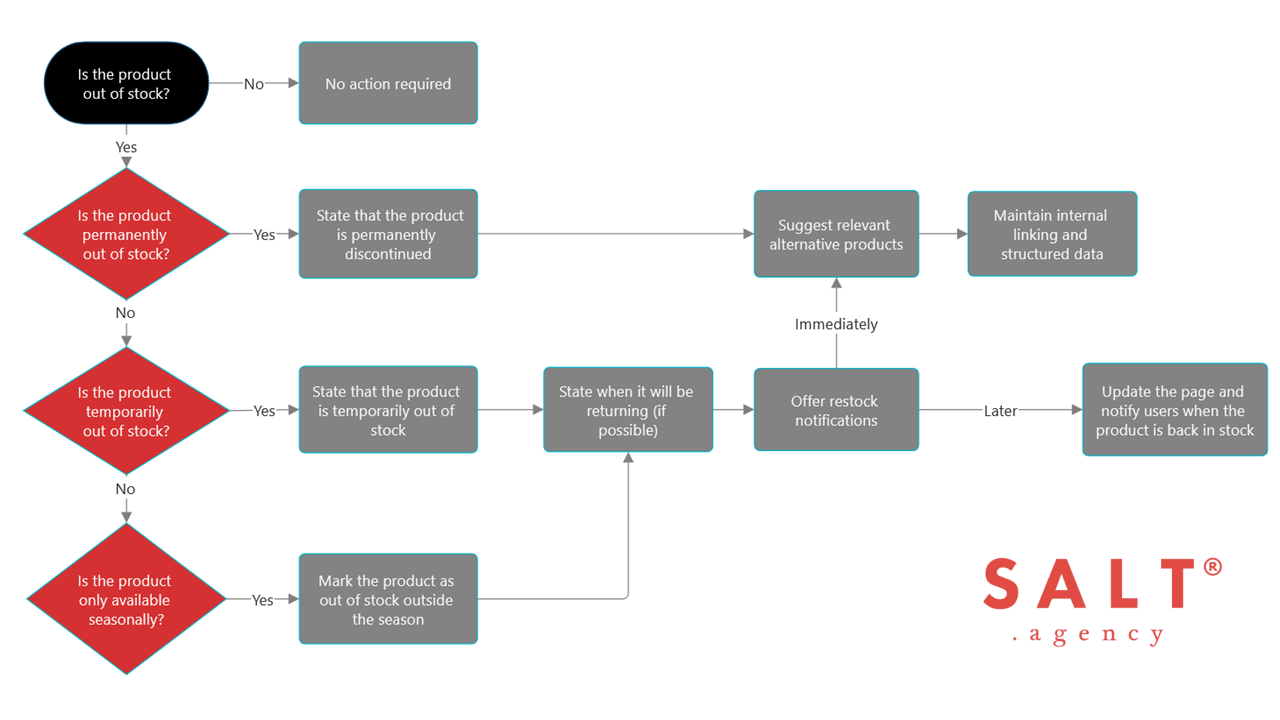
There’s no one-size-fits-all solution for handling out-of-stock product pages. The right approach often depends on whether the product is permanently discontinued, temporarily unavailable, or seasonal. View our flowchart for a quick overview, or find a more detailed guide below.
For permanently out-of-stock products
When a product is permanently discontinued, the goal is to preserve as much SEO value as possible while still being honest with users.
In most cases, the best approach is to keep the original product page live and clearly communicate that the item is no longer available, while suggesting relevant alternatives. This allows you to retain any valuable keyword rankings the page has earned, keeps users on your site, and ensures potential customers don’t encounter any generic, frustrating 404 pages and dead ends.
You should also update product schema to reflect availability using the ItemAvailability property. This lets search engines know whether a product is out of stock, and allows them to display its availability in search results.
For temporarily out-of-stock products
Temporarily out-of-stock products should almost always remain accessible. Removing or redirecting these pages risks losing keyword rankings and creates unnecessary work when the product is back in stock.
A well-handled temporarily out-of-stock product page should:
- clearly label the product as out of stock
- indicate when it is expected to return, if possible
- let users know if the product is available in other nearby locations
- offer restock notifications
- suggest relevant alternative products.
When the product is available again, the page can be easily updated, allowing you to capitalise on its existing authority.
Remember: any email addresses used for restock notifications must follow data protection regulations. Clear consent, transparent usage, and easy opt-out settings are essential.
For seasonal products
Seasonal products require a slightly different strategy. These are items that are only in stock for part of the year, such as Christmas-related products or seasonally-available foods.
For seasonal products, it’s usually best to keep the page live all year round, while marking it as out of stock outside the relevant season.
Retailers like B&Q often keep seasonal product pages indexed, updating messaging as seasons change. This allows it to build authority and rankings over time, rather than starting from scratch each year. When the page is out of season, it’s updated with helpful copy that explains when it will return and links to relevant alternatives.
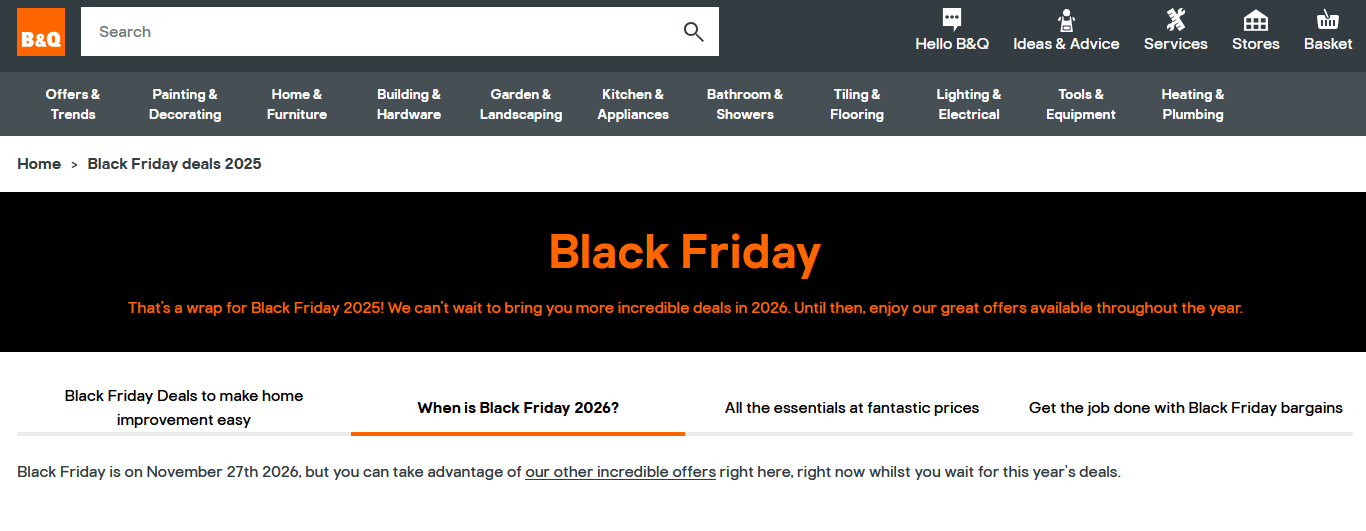
From an SEO perspective, this approach allows the page to continue gaining traffic and building authority throughout the year, which can lead to stronger performance when the product or deal returns.
Choosing the best tactic for your site
While keeping out-of-stock pages live is recommended, some businesses may opt for alternative approaches in certain situations. Here are a few additional considerations.
Site size and crawlability
For large, enterprise-level ecommerce sites with tens of thousands or even millions of URLs, high numbers of out-of-stock pages can impact crawl efficiency.
In these cases, businesses may choose to:
- keep out-of-stock pages live for only the most in-demand, high-value products
- use noindex tags to prevent low-value out-of-stock pages being crawled
- implement indexing rules based on stock duration or page value.
Product lifecycle and demand
Not all products should be treated equally. A discontinued product with ongoing search demand, for example, should be treated differently from a low-demand item with no backlinks or historical performance.
Factors to consider include:
- search volume
- backlink profile
- historical conversion data
- brand importance.
If an out-of-stock product scores low on all these factors, simply removing its page may be the better option.
CMS limitations
Some content management systems (CMS) make it difficult to keep discontinued product pages live while still offering a good user experience. If this is the case for your CMS, a carefully chosen redirect is usually the best alternative.
Options include redirecting to the product’s overarching category page or to a similar replacement product. This helps to:
- prevent search engines wasting crawl resources on low-value 404 pages
- retain some SEO value from any backlinks to the original product’s URL
- guide users to relevant alternative products.
However, this approach is usually much less effective than retaining the original product page, and should only be used as a last resort.
Balancing user needs and SEO
Ultimately, the best approach balances clarity and convenience for users with long-term SEO performance.
If a tactic preserves rankings but frustrates users, it’s unlikely to deliver sustainable results. Likewise, a great user experience that destroys organic visibility can limit growth. Handling out-of-stock product pages effectively is a balancing act that requires careful judgement on a case-by-case basis.
Improve your out-of-stock product pages
Products going out-of-stock is an ongoing problem for many businesses, but when handled well, these product pages can present opportunities, too.
They can preserve and grow your website’s organic visibility, recover otherwise lost revenue, and strengthen customer trust. But when handled poorly, they can waste crawl budget, frustrate users, and erode performance over time.
If you need support with your ecommerce website, SALT.agency can help. Find out what our award-winning ecommerce SEO services can do for you, or contact our team to learn more.


