Five rich snippet strategies for ecommerce sites
This is a peak-trading playbook: five rich snippet strategies to check and validate before Black Friday, Cyber Monday, Christmas, Boxing Day sales, and other seasonal and promotional sales events.
These are some of the busiest days for ecommerce, yet you can’t just turn up and hope to capitalise on potential customers. Markup, product data, and stock rules behind your search listings must be in place weeks before.
However, ecommerce sales happen all year long and the peak sales months will vary from retailer to retailer.
A good ecommerce SEO strategy will have prepared your site so that you can be found at the top of the SERPs for when customers come ready to buy.
But how can you convince customers to make that final click to land on your site rather than your competitors? Using structured data for rich snippets can help.
What is a rich snippet?
A rich snippet is a search result that shows extra information in the SERP, such as star ratings, price, stock status, or delivery details, alongside the page title, URL, and meta description. Google now calls these rich results (“rich snippets” was retired as a label in December 2017). It generates many of them from structured data on your page.
A typical search result will include a title tag, meta description and breadcrumbs. A rich snippet will include additional features that provide extra information and relevancy to search engines and end-users.
Here’s an example of a standard search result:

Rich snippet types
There are many different types of rich snippets. Common ecommerce rich snippet examples include:
Carousel
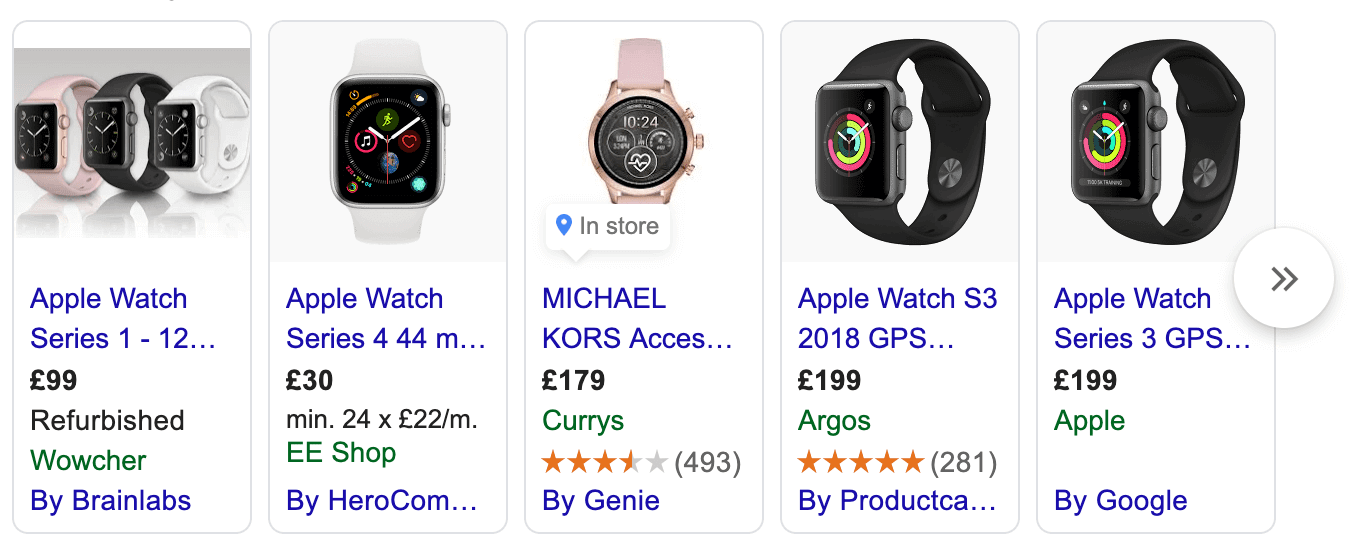
A shopping carousel for watches. Much of what appears here comes from Shopping ads and free product listings fed by Merchant Center and Product markup, rather than markup alone.
Reviews

Merchant listing
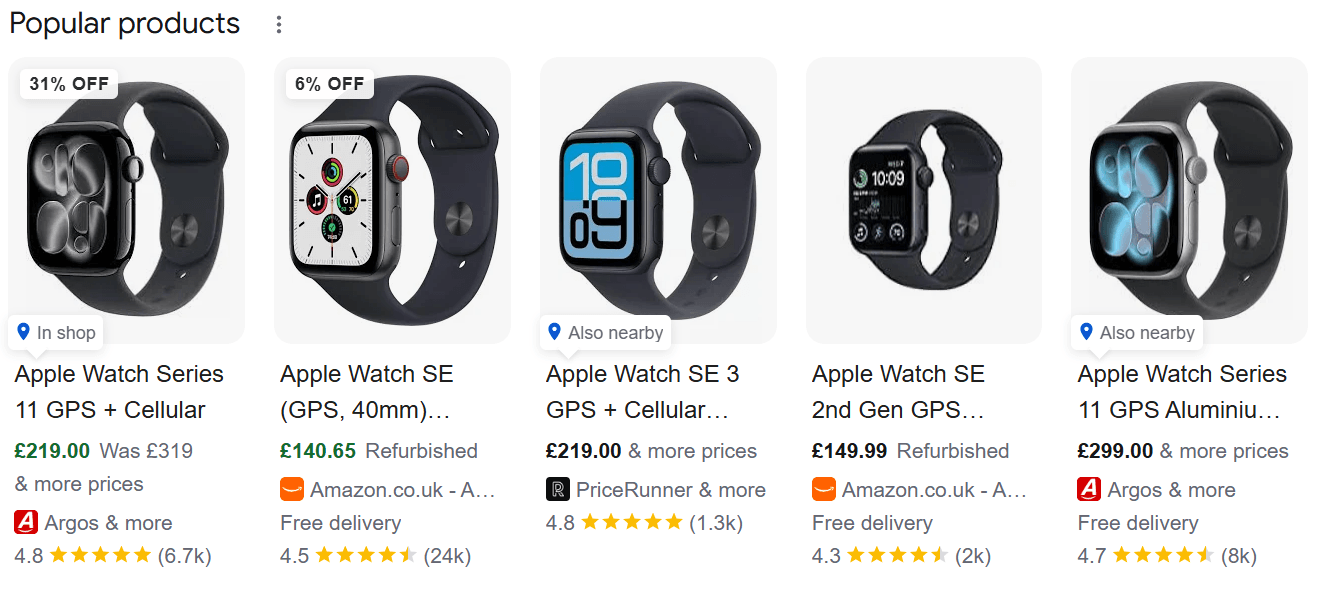
These rich snippet examples are some of the most recognisable. Google’s search gallery lists every rich result type currently supported, including:
- Product snippets (showing price, availability, and ratings)
- Merchant listings (including shipping and returns details)
- Review snippets
- Breadcrumbs
- Events
- Organisation details (such as logo and site name)
- Videos
- Recipes.
What impact can rich snippets have?
Rich snippets don’t change where you rank, but they can increase how much attention your site gets once it appears in the SERP.
Rich results contain more visual elements, including, but not limited to, star ratings, photos, or video screenshots. The addition of the visual elements draws the attention of the search visitors to rich snippet results.
An example of this can be seen on page one of Google for the search “buy iPhone 18 online” on both mobile and desktop devices. In the examples below, the rich snippet includes the price, stock, delivery, and returns information.
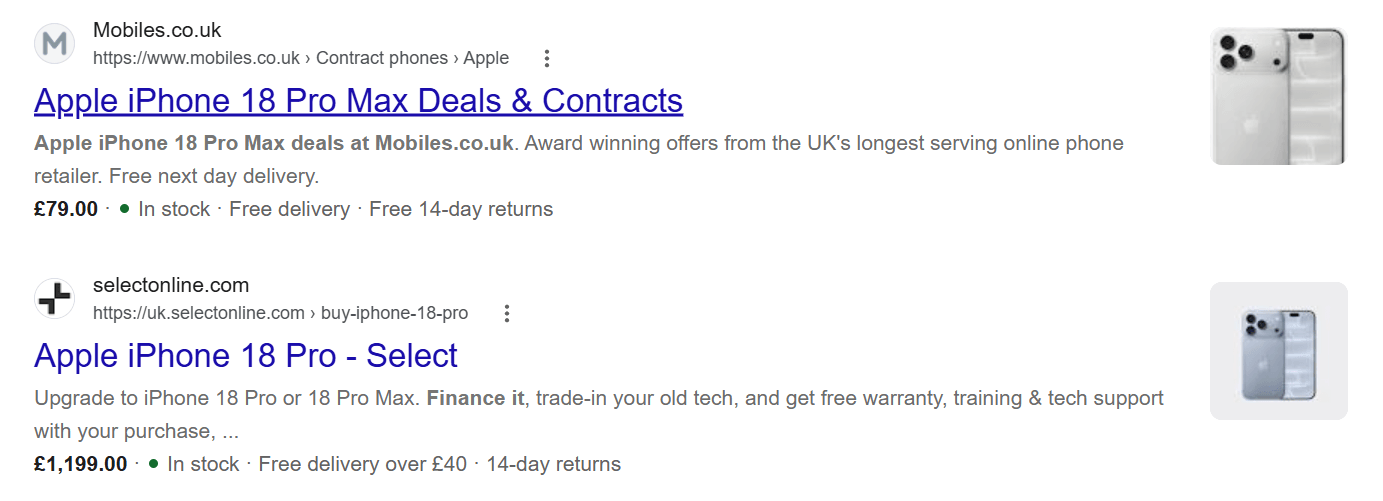
And this is even more impactful on mobile, where each result takes up a larger percentage of the screen:
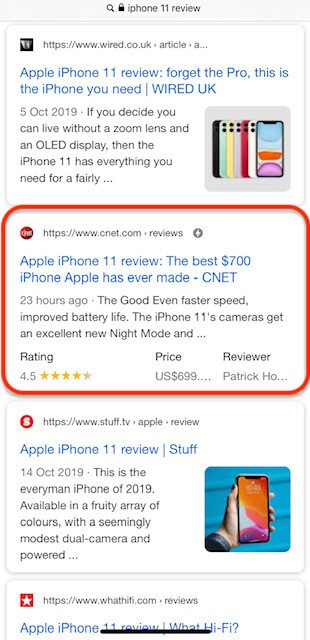
Listings that stand out are more likely to earn a click, especially when any extra detail in the results page answers a shopper’s question.
Google has long said rich results aren’t a ranking factor and won’t boost rankings. As recently as April 2025, John Mueller said structured data won’t make a site rank better.
However, structured data still helps Google understand your products and entities, and it can earn richer listings when your markup meets Google’s guidelines. That’s the real job of rich snippet SEO: winning the click on rankings you already have.
In 2017, Gary Illyes was quoted by Search Engine Journal as saying:
…add structure data to your pages because during indexing, we will be able to better understand what your site is about.
It will help us understand your pages better, and indirectly, it leads to better ranks in some sense, because we can rank easier.
Treat that as help with comprehension, not a guaranteed ranking lever.
With that in mind, here are five examples of how rich snippets can be implemented for ecommerce, how they work, and what the likely benefits are:
Five rich result tactics to validate before peak trading
When potential customers are in the buying phase, you need to convince them to complete their transaction with you rather than a competitor. Here are five strategies that include optimising your ecommerce content for rich snippets.
High-quality images
Optimising images is an incredibly simple SEO task, but there are still businesses that are not making the most of it.
Look at this desktop SERP for “Christmas Jumper”.
When we looked, it included 14 high-quality images: five organic and nine sponsored images.
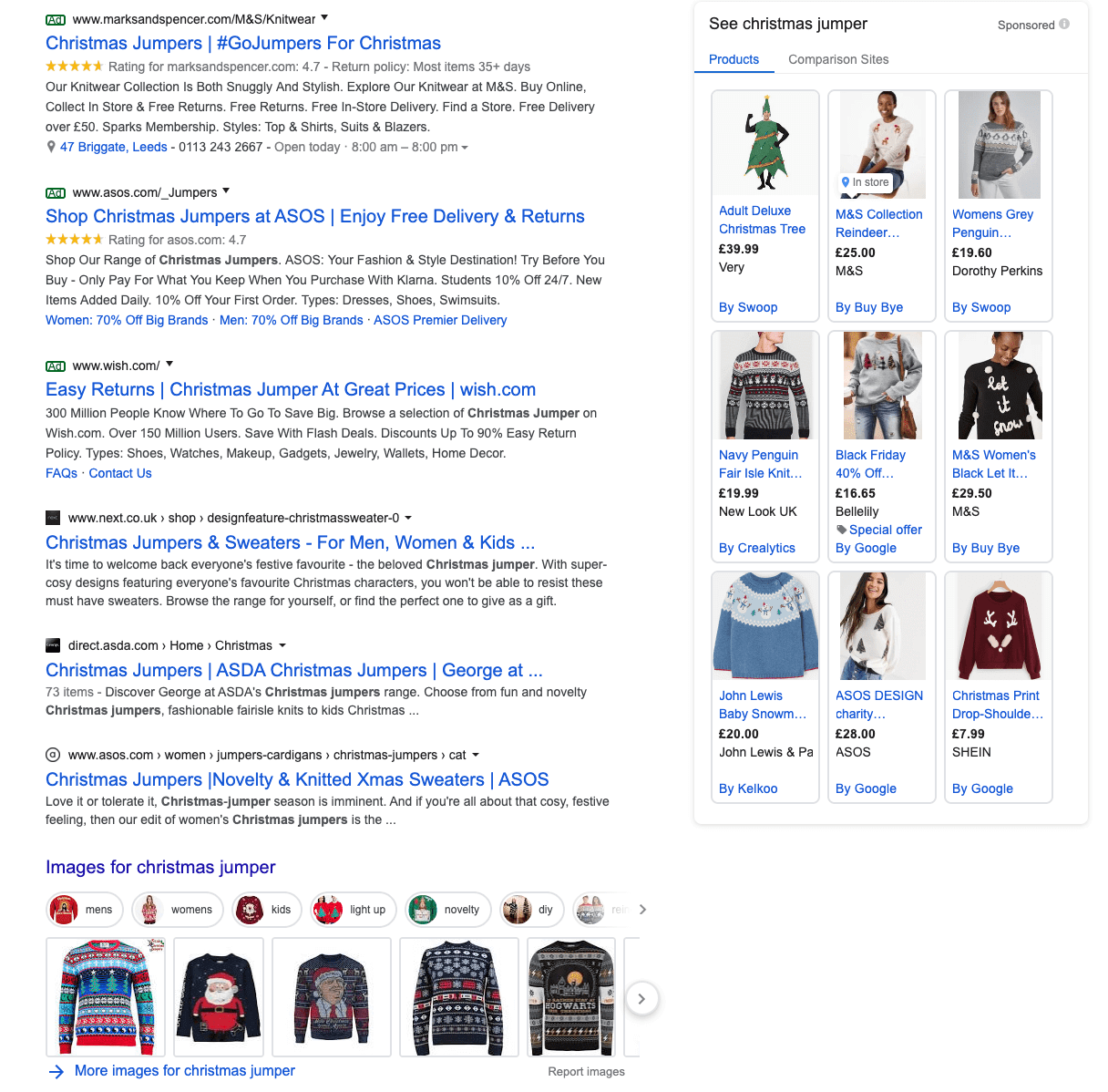
What do you notice between the sponsored and organic images?
The organic images lack models in their images and hence each of the photos feature more of the actual product in the image. It doesn’t stop there, though.
Looking at the sponsored images in more detail, there is also a lack of proper alt text for ALL nine sponsored image listings.
The alt text is missing or using something non-descript like “carousel image 0” instead.
Big brands are simply spending money to appear in ads, but not even competing in organic listings.
Not all of this is rich snippet territory. A visual results page mixes organic image results, Shopping ads, and product-related rich results. Image quality and alt text help your products appear in image results, while Product markup, including its image property, makes them eligible for price, availability, and review enhancements.
Tips for product optimisation
- Use descriptive alt text for all images. Make sure any plugins are not interfering with search engines ability to see this.
- Use clear, simple product images. Include only the necessary on a plain background as best as possible.
- Keep image file sizes to a minimum. Use modern image formats such as webp where possible.
Reviews
For over three decades, Amazon has shown how much reviews matter.
Amazon introduced customer reviews in 1995, the year it launched, which surprised many at the time. Three decades later, reviews are a key trust signal in online shopping.
Amazon has become expert at implementing review rich snippets for all sorts of products.
A selection of products that use this includes:

Although the ratings are not included on all Amazon listings, they are included on most individual product pages, using on-page review data to populate the schema.
But using reviews is not exclusive to Amazon; anybody can use it.
To use review snippets, you must mark up your own review data, including the average rating and the number of reviews or ratings. That means using real reviews customers left for a specific product, not ratings copied or aggregated from Amazon or other websites, as Google’s review snippet guidelines don’t allow that.
Tips for implementing reviews
- Remember that anybody with a product page can use it.
- Reviews can only be used on product pages and not category pages.
- Don’t mark up reviews of your own business on your homepage, as Google doesn’t show self-serving reviews of a business as review snippets.
The data you use to represent your reviews must come from your own customers.
Pricing and offers
So, you’ve got to the top of the SERPs for a product that you have a great deal on (and lots of stock to sell!). How can you show potential customers that you have the best price? Implement accurate Product and Offer structured data — price, currency, and availability — on your product template.
When on-page Product/Offer facts match your Merchant feed, the same clean product data supports classic rich results and AI shopping surfaces that read product attributes. Eligibility still depends on each system’s rules.
An example is for “iPhone X” which includes a price and availability:
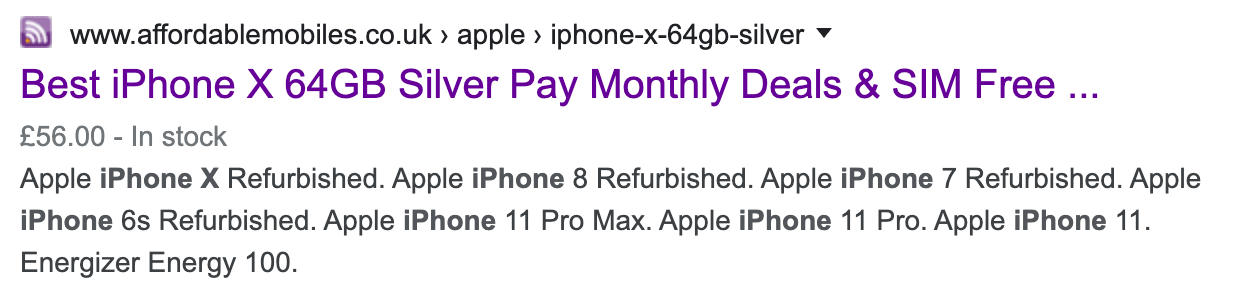
And when the product is unavailable, the rich snippet can be updated to show it as out of stock:

Although this seems counterintuitive to convince search visitors not to click on the product page, the result also shows sitelinks that make the most of a good search engine ranking for an old model. Google automatically generates sitelinks, not by markup, but they work alongside your availability data here.
This can then convince visitors to visit a newer product and convert on a different in-stock product.
This may seem like a lot of effort, but it’s a much better experience than a shopper clicking through to an out-of-stock page with no warning, getting frustrated, and bouncing straight away.
Pair availability markup with a deliberate plan for out-of-stock URLs, so shoppers who click land on a useful alternative rather than a dead end.
Important note: Price markup sits inside an Offer, which needs a price and a currency. Add availability too, as that shows “In stock” or “Out of stock” in results.
Tips for implementing pricing and offer rich snippets
- Use pricing and availability rich snippets to increase the amount of useful information in your listing.
- Re-use listings for ‘old’ products and convert them to newer products.
- Add a sense of urgency by showing availability.
- Demonstrate multiple products available by including a price range for products.
Events
Are you an ecommerce site selling tickets for events rather than physical products? Well, you’re in luck. There’s a specific schema for you.

By including additional structured data about your events, what they are, where they’re located and information regarding pricing and availability, you become eligible for more rich snippets like this.
Results like the above are still likely to be found when visitors are looking for specific events in certain cities, and they also increase your visibility for generic search terms like “events near me” or “events in London”, for example.
Tips for event rich results
- Event rich snippets can be used for both paid and free events.
- Including more information increases your chances of being found for more search terms.
- Don’t use this rich snippet for anything that isn’t a dedicated event.
Shipping and returns
Delivery speed, cost, and returns often decide a purchase, especially for something like a Christmas present. Google can now show these details alongside your product listings.
Google added organisation-level return policy markup in June 2024 and organisation-level shipping policy markup in November 2025, along with the option to set both directly in Search Console. Policies set for individual products still take priority over site-wide ones.

For peak trading, keep your shipping and returns markup in step with the policies you actually run. Include things like Christmas delivery cut-offs, extended returns windows, and free-delivery thresholds.
If you have a Merchant Center account, the settings you choose in Search Console take precedence over your website’s markup. Ensure the two don’t contradict each other.
Google retired the sitelinks search box in November 2024. If you previously used sitelinks search box markup, there’s no need to remove it, as unsupported structured data won’t cause errors, but it no longer earns a SERP feature.
Tips for shipping and returns rish results
- Set an organisation-level policy for the rules that apply to most products, and product-level policies for exceptions.
- Place shipping policy markup on the page where you describe your shipping policy, as Google recommends.
- Update cut-off dates and return windows before peak, not during it.
Using structured data to implement rich snippets
To start optimising for rich snippets in the SERPs, you need to provide your data in the form of structured data.
This allows search engines to understand the context of the content and turns previously ambiguous data into clearly defined data. And when talking about structured data, there are two things of importance: markup and schema.
Markup refers to the structured data language used with examples including Microdata, JSON-LD and microformats.
And schema is the vocabulary that can turn this structured data into content that can be displayed as rich snippets.
What is schema?
In 2011, the search engine teams at Google, Bing, and Yahoo, joined later that year by Yandex, got together to create Schema.org with the aim of creating a consistent and easy-to-use data markup tool.
The best explanation of Schema.org we could find was from the schema.org site itself:
Schema.org provides a collection of shared vocabularies webmasters can use to mark up their pages in ways that can be understood by the major search engines: Google, Microsoft, Yandex and Yahoo!
Simply put, once you have picked which rich snippet(s) to optimise for, you just need to find the appropriate schema framework and complete the mark-up for each property.
It is possible to use one of two formats, microdata or JSON-LD, to mark up these results. Below are screenshots for the corresponding markup for the question ‘what is the return policy?’:
The example uses FAQ markup. However, since August 2023, Google has only shown this for well-known government and health websites, so treat it as an illustration of the two formats rather than a tactic to use.
Microdata:
<html itemscope itemtype="https://schema.org/FAQPage">
<head>

<title>Example Site - Frequently Asked Questions(FAQ)</title>

</head>

<body>

<div itemscope itemprop="mainEntity" itemtype="https://schema.org/Question">

<h3 itemprop="name">What is the return policy?</h3>

<div itemscope itemprop="acceptedAnswer" itemtype="https://schema.org/Answer">

<div itemprop="text">

<br /><p>Online purchases may be returned via a major parcel carrier. <a href="http://example.com/returns"> Click here </a> to initiate a return.</p>

</div>

</div>

</div>
Most unopened items in new condition and returned within <strong>90 days</strong> will receive a refund or exchange. Some items have a modified return policy noted on the receipt or packing slip. Items that are opened or damaged or do not have a receipt may be denied a refund or exchange. Items purchased online or in-store may be returned to any store.
JSON-LD:
<html>

<head>

<title>Example Site - Frequently Asked Questions(FAQ)</title>

<script type="application/ld+json">

{

"@context": "https://schema.org",

"@type": "FAQPage",

"mainEntity": [{

"@type": "Question",

"name": "What is the return policy?",

"acceptedAnswer": {

"@type": "Answer",

"text": Most unopened items in new condition and returned within <strong>90 days</strong> will receive a refund or exchange. Some items have a modified return policy noted on the receipt or packing slip. Items that are opened or damaged or do not have a receipt may be denied a refund or exchange. Items purchased online or in-store may be returned to any store.<br /><p>Online purchases may be returned via a major parcel carrier. <a href=http://example.com/returns> Click here </a> to initiate a return.</p>"}
Both provide the same information and are both as likely to be shown as a rich snippet — but which one is recommended to implement?
What is microdata?
Microdata is HTML semantic markup that, at its most basic level, nests metadata within content on webpages. Using microdata allows properties to be applied to item types which contain multiple attributes.
This allows search engines to extract additional information from webpages, which in turn helps them show more relevant results to organic search visitors.
What is JSON-LD?
JSON-LD, which is short for “JavaScript Object Notation for Linked Data”, is similar to microdata, in that it allows you to assign data to properties and item types.
However, because it is a script element rather than inline HTML, it allows greater flexibility during implementation, allowing it to be placed in the head section with other metadata, or even in the body tag.
Which one should I use?
Google supports both types of markup data, but its documentation recommends JSON-LD whenever possible. It’s also the easier format to implement and maintain across a site.
Because microdata must be added in line with HTML, this makes the process incredibly manual, which is not only time-consuming, but prone to mistakes.
On the other hand, JSON-LD can be added across many pages at the same time. This makes it easier to add, modify or remove in the future.
How to implement structured data on your site
Once you’ve decided which rich snippet(s) you wish to optimise your content for, you just need to choose the right schema type.
Depending on the CMS that you are using for your website, the options available to you vary. For example, WordPress has a multitude of plugins that can implement schema relatively easily across single or multiple pages.
Many ecommerce platforms and themes output some Product markup by default, though it’s often incomplete, so check and update it if necessary.
However, if you are using a CMS like Magento and are implementing schema across your site for the first time, this will require the involvement of a developer to help you set this up.
Regardless of how you set up your schema, always check the implementation before it goes live.
A worked example: Product markup ready for peak trading
Here’s an example of what a complete Product markup looks like for a single product, using JSON-LD. It covers price, stock, ratings, delivery, and returns.
<script type="application/ld+json">
{
"@context": "https://schema.org",
"@type": "Product",
"name": "Fair Isle Christmas Jumper",
"image": "https://www.example.com/images/fair-isle-jumper.jpg",
"sku": "FI-JUMPER-RED-M",
"brand": { "@type": "Brand", "name": "Example Knitwear" },
"aggregateRating": { "@type": "AggregateRating", "ratingValue": "4.6", "reviewCount": "128" },
"offers": {
"@type": "Offer",
"url": "https://www.example.com/fair-isle-jumper",
"price": "39.99",
"priceCurrency": "GBP",
"availability": "https://schema.org/InStock",
"shippingDetails": {
"@type": "OfferShippingDetails",
"shippingRate": { "@type": "MonetaryAmount", "value": "0", "currency": "GBP" },
"shippingDestination": { "@type": "DefinedRegion", "addressCountry": "GB" },
"deliveryTime": {
"@type": "ShippingDeliveryTime",
"handlingTime": { "@type": "QuantitativeValue", "minValue": 0, "maxValue": 1, "unitCode": "DAY" },
"transitTime": { "@type": "QuantitativeValue", "minValue": 1, "maxValue": 3, "unitCode": "DAY" }
}
},
"hasMerchantReturnPolicy": {
"@type": "MerchantReturnPolicy",
"applicableCountry": "GB",
"returnPolicyCategory": "https://schema.org/MerchantReturnFiniteReturnWindow",
"merchantReturnDays": 60,
"returnMethod": "https://schema.org/ReturnByMail",
"returnFees": "https://schema.org/FreeReturn"
}
}
}
</script>
Each block maps to something a shopper sees:
- Offer provides price and stock
- Rating shows the stars
- Shipping details show delivery cost and speed
- Return policy shows the return window
The values must match what’s visible on the page and come from your product database — not be manually entered.
For a peak event, the fields most likely to need changing are price, availability, transit time, and merchantReturnDays. If those come from your template rather than being hard-coded, a returns extension becomes one setting change rather than a site-wide edit.
How to test your structured data
Test your structured data with Google’s Rich Results Test. This shows which rich results a page is eligible for and flags any errors and warnings.
- Paste in a URL or code snippet to check that your markup has been set up correctly and that all required fields are filled in.
- Monitor Search Console rich-result reports(Merchant listings and Product snippets), to catch errors, and clear template-level JSON-LD issues before peak trading rather than during it.
Use the Schema Markup Validator to see what competitors have marked up, including schema types Google doesn’t show as rich results. This shows what competitors are optimising for, helping you make strategic decisions.
Four rich snippet mistakes that cost retailers at peak
Incorrect markup causes most broken rich snippets, so avoid these mistakes.
- Markup doesn’t match the page: Structured data must reflect what shoppers can see. A price or stock status different from what’s on the page can cost you the rich result.
- Duplicate Product markup: A theme and a plugin or app can each output their own Product block. Our analysis of beauty retailers found several products marked up twice, making it harder for Google to read the right data.
- Sales data that outlives the sale: Prices left in markup after a promotion ends can create a mismatch.
- Stock status lagging behind reality: Markup added with JavaScript can make Shopping crawls less frequent and less reliable, which affects fast-changing details like price and availability. Where possible, output Offer data in the initial HTML.
How to measure whether your rich snippets are working
Filter by Search appearance in Search Console’s Performance report to see clicks and click-through rate for listings shown as product snippets, merchant listings, or review snippets.
Look at the date each enhancement goes live and compare the same pages before and after. At peak, compare year on year rather than month on month, to avoid accidentally mistaking seasonal demand for a rich result effect.
Your pre-peak rich results checklist
Use this checklist to ensure your rich results are ready before peak demand arrives:
- Run every product, category, and policy template through the Rich Results Test.
- Check that sale prices in your markup match the price on the page and in your product feed.
- Confirm availability updates automatically when a product sells out.
- Update shipping and returns policies for any seasonal delivery cut-offs and extended returns windows.
- Keep review markup on product pages only and use your own customers’ reviews.
- Clear errors in Search Console’s rich result reports at least two weeks before any seasonal event.
Earn the click with a clear rich snippet strategy
Keyword rankings get you onto the page. Rich snippets help get you a click when you’re there.
A clear rich snippet strategy can improve CTR by adding scannable detail and using more space on the results page, especially for competitive product queries where your pages already rank. The value comes from keeping markup accurate when prices, stock, and policies change.
Plenty of product listings still miss the basics, from alt text to availability markup. Run your templates through the checklist, fix the mistakes, and set up the Search appearance filter to see the difference when seasonal sales start.
Speak to one of our team for more help with your rich snippet strategy.


