Setting up your ChatGPT Business Hub
OpenAI has introduced Businesses in ChatGPT as a beta release alongside a dedicated administrative portal called Business Hub.
Found directly within the standard navigation sidebar, the system allows organisations to claim their brand identity, synchronise structured inventory feeds, review user discovery trends, and launch bespoke conversational AI agents.
Core capabilities
At the foundation of the platform sits brand management, which enables companies to oversee operational details, opening hours, contact details, and commercial offerings. Retailers can upload inventory data through an extensive catalogue schema comprising 48 individual fields or integrate their catalogue directly through Shopify.
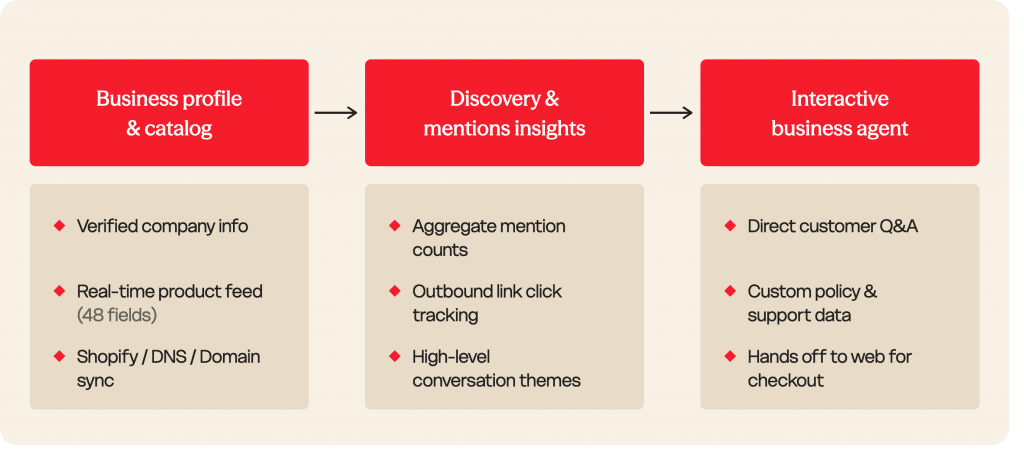
Alongside catalogue ingestion, the hub provides an analytics dashboard detailing how frequently the model mentions a company, the volume of outbound clicks directed to its website, and the primary conversational themes that prompted those references. Because the platform attaches attribution tags to outbound links, marketing teams can cross-reference these discovery counts within their own web analytics platforms.
Users who come across a business within an answer can also launch a dedicated chat with an automated assistant trained on company policies, customer guidance, and product literature.
Verification and setup
Claiming an organisation involves a multi-stage authentication process designed to stop unauthorised parties from taking control of commercial listings.
An administrator signs in through their business account, locates the company entry within the hub, and completes initial ownership verification through domain records, telephone confirmation, company email, or an active e-commerce connection.
Securing full verification, enabling catalogue feeds, and activating automated assistants requires identity authentication through Persona, which requires submitting official identity documents and proof of legal representation. Once a newly registered listing is approved, it publishes immediately to the public, and administrative teams cannot subsequently delete or unpublish that profile.
Current Limits
At the time of publishing*
| Capability | Current Availability | Key Constraints |
| Business Hub & Claiming | Global (where ChatGPT operates) |
Requires a working website and official authorisation. No centralised parent-company dashboard for multi-location brands yet.
|
| Product Feed Ingestion | US-focused rollouts and Shopify merchants |
Feeds require 9 mandatory fields out of 48 total schema points.
|
| Business Agents | US only |
Limited to eligible e-commerce and online services. Agents cannot process transactions, inspect order histories, or handle account logins.
|
| Conversation Insights | Global beta |
Raw prompts and individual customer chats are never shown. Data appears only after crossing anonymisation thresholds.
|
Delegating access
The primary administrator who claimed the business profile can delegate access to colleagues and external agencies directly within the platform.
Delegating access works in a few distinct ways depending on how your organisation is set up.
Inviting colleagues and agencies
The claiming administrator can invite team members or agency partners via their individual ChatGPT email accounts within Business Hub. Each individual must access the portal through their own credentials rather than sharing logins or forwarding an initial claim link.
Workspace account requirements
If your business profile was claimed from within a ChatGPT Business or Enterprise organisation, invitees generally need to be members of that specific workspace before they can access the Business Hub profile and its data.
Role permissions
Inside team and enterprise workspaces, OpenAI supports designated roles, including an Analytics Viewer role, which provides read-only permission to inspect analytics dashboards and reporting without allowing administrative edits or profile reconfiguration.
Claiming the profile does not improve your ChatGPT visibility
It goes without saying, but claiming your profile doesn’t impact your AI visibility or grant favouritism within the model.
OpenAI explicitly states that claiming a profile does not guarantee higher ranking, preferred recommendations, or increased sales. ChatGPT treats verified data as one input among many web sources when generating answers.
In conversational shopping comparisons, ChatGPT routinely attributes sales and links to downstream distributors and retailers rather than the direct-to-consumer manufacturer if third-party pages have stronger authority.
Reach out to discuss your 2027 AI search strategy and turn ChatGPT into a measurable revenue channel for your business.


